

Why a hosting control panel should never log in to your servers
A panel that reaches into servers to change them is a single key to every machine, and it only knows what it did, not what is there. Turn the arrow round.

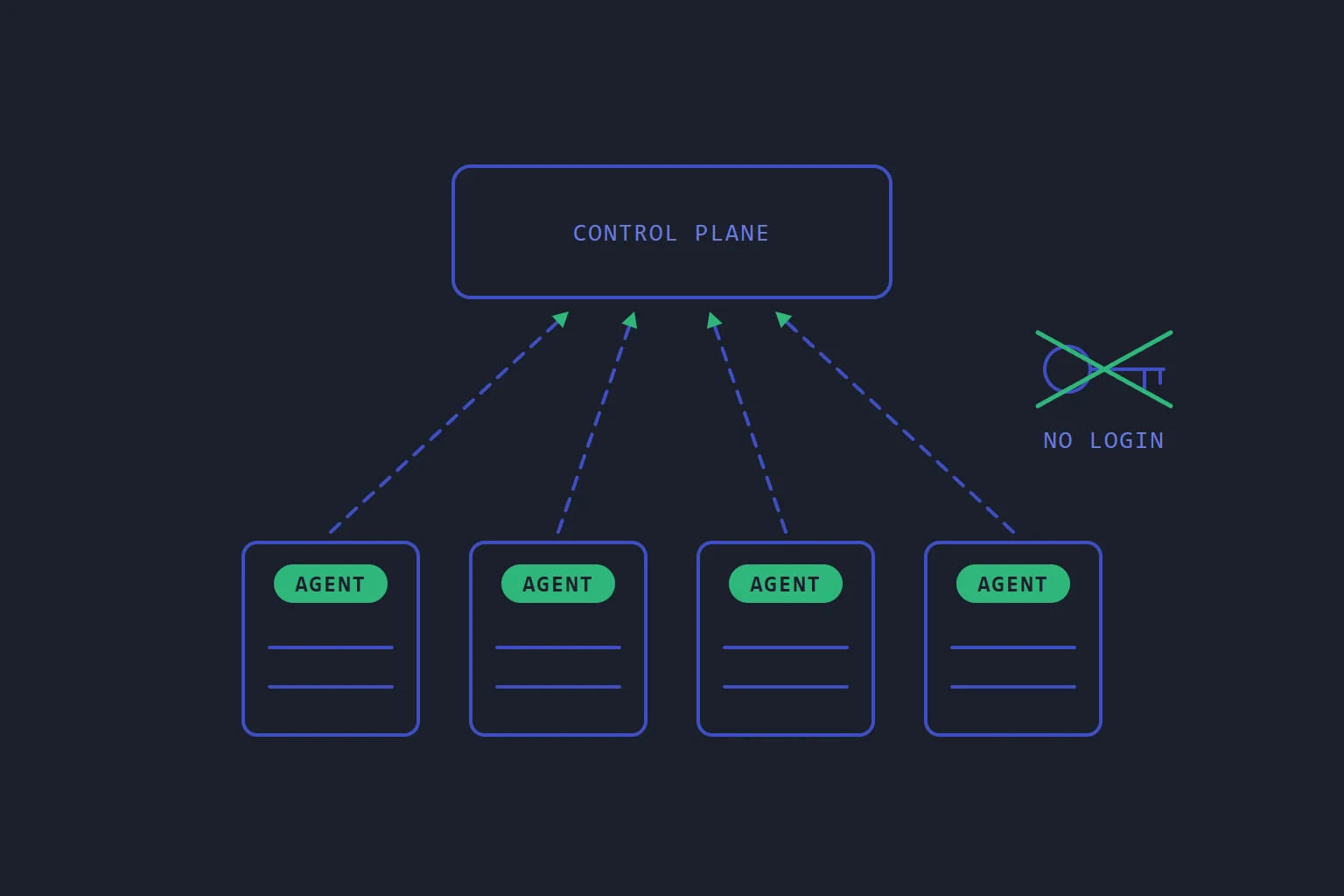
The obvious way to build a hosting control panel is for the panel to reach into the servers. It logs in over SSH as root, or calls a daemon listening on each machine, and runs whatever the button needs: create the site, write the config, reload the web server.
It works, and it has two problems that do not show up until a bad day.
What pushing gets wrong
The panel holds a way into everything. To reach every server, it has to keep credentials for every server, and every server has to accept connections from it. The most valuable machine to break into is the one that can log in to all the others, and you have built it on purpose.
The panel knows what it did, not what is there. Its database records that it wrote a config at ten past three. It does not know that somebody edited that file by hand at two in the morning during an incident, or that a package update replaced it, or that a server restored from an old image is missing half its sites. The panel's picture of the fleet is a list of its own actions, and it drifts from the truth quietly.
Pushing also has awkward edges. A server that is offline when the change goes out simply misses it. A change made of several steps can stop halfway, leaving a machine in a state nobody designed.
Turn the arrow round
kstack, the control plane our own hosting runs on, does it the other way. The control plane records what should exist. An agent on every server asks the control plane, over HTTPS with the server's own certificate, which version of the setup it should be running, and makes it so. Nothing connects in to a server.
That covers buttons as well. When you press something that should happen now, the agent is already holding a request open to the control plane, waiting for work, so the job reaches it straight away without the server ever accepting a connection.
Each run of the agent goes through the same steps:
- Fetch. Ask the control plane what this server should be running.
- Observe. Read what is really on the machine, not what a database believes is there.
- Check. Build the difference in a staging folder and test it before anything live is touched. A config that would not start is refused.
- Apply and report. Swap the new version in, keep the previous one for rollback, and send the result back. If a step fails, the whole run is rolled back.
The reconcile loop article goes through it in more detail.
What falls out of it
None of the following were features added on top. They follow from the server pulling.
Hand edits are put right. Someone changes a setting on a server. The next run notices the file is not what it should be, puts it back, and reports it. Drift is treated as something to report, not an error, so you hear about it from the report rather than from a customer months later.
Servers keep serving if the control plane is down. Each server holds its own copy of what it should run. The sites on it do not depend on the control plane being reachable, so an outage of the panel is an outage of the panel.
A rebuilt server catches up. Reinstall the machine, enrol the agent, and it builds everything that belongs on it through the same path as an ordinary change. That path runs constantly, so it is not a recovery procedure you discover is broken on the worst day of the year.
Nothing is left half-applied. Everything is built and tested before it is swapped in, so a server is never left between two versions.
What a stolen server can reach
Pulling also narrows what an attacker gets from one machine. A server's certificate authorises requests about that server and no other. Secrets reach a server only when they belong to something placed on it, over the same authenticated channel, and never appear in the description of what it should run.
The control plane still matters. It holds what should exist everywhere and it has to be protected like it. What it does not hold is a login to your servers.
The costs
This is not free, and it is better to know the costs before you choose it.
You cannot fix a server by hand and expect the fix to stay. The next run puts it back. During an incident that feels like the system fighting you. The fix is to make the change in the control plane, where it is recorded and survives, which is a habit change for anyone used to editing configs directly.
Every run has to look before it acts. Reading the real state of a machine on every run is work that a push model never does. It has to be designed to be cheap, or the loop gets slow as the server fills up.
An offline server is behind until it comes back. It catches up on its own when it does, which is better than missing the change, but its state is stale until then.
The short version
If you run your own hosting, look at which direction the arrows point.
- Can your panel log in to your servers? Then whoever takes the panel can too.
- Does it know what is on a server, or only what it did? If it never reads the machine, a hand edit is invisible until it causes a fault.
- What happens to a server's sites if the panel is down? If the answer is anything other than "nothing", the panel is part of your serving path.
That is the design behind kstack: servers ask, the control plane answers, and nothing logs in.
- kstack
- architecture
- security
- operations
Read next
- SoftwareWe sell billing, the control panel and monitoring separately because each one owns different facts
Zephyr, kstack and Standby are three products, not a suite. The reason is a rule about who owns which fact, and it is just as useful if you only ever run one of them.
- SoftwareA checkout should refuse the order it cannot fulfil
Billing systems take the money first and provision second. That ordering is correct, and it means every gap in your provisioning becomes a charge you have to explain and a refund you have to make.
- OperationsYour status page should not share a host with the thing it reports on
The page people load during an outage is the one most likely to be taken down by it. That is an architecture decision, not a hosting detail.
- HostingWhat "isolation" actually means in shared hosting
Most panels isolate per account. Doing it per website costs more and is the difference between one compromised site and all of them.