

Let a coding agent work on your site without giving it your account
Most ways of letting a coding agent onto a website hand it a credential made for a person. Give it one that reaches one site, writes to a copy, and leaves going live to you.

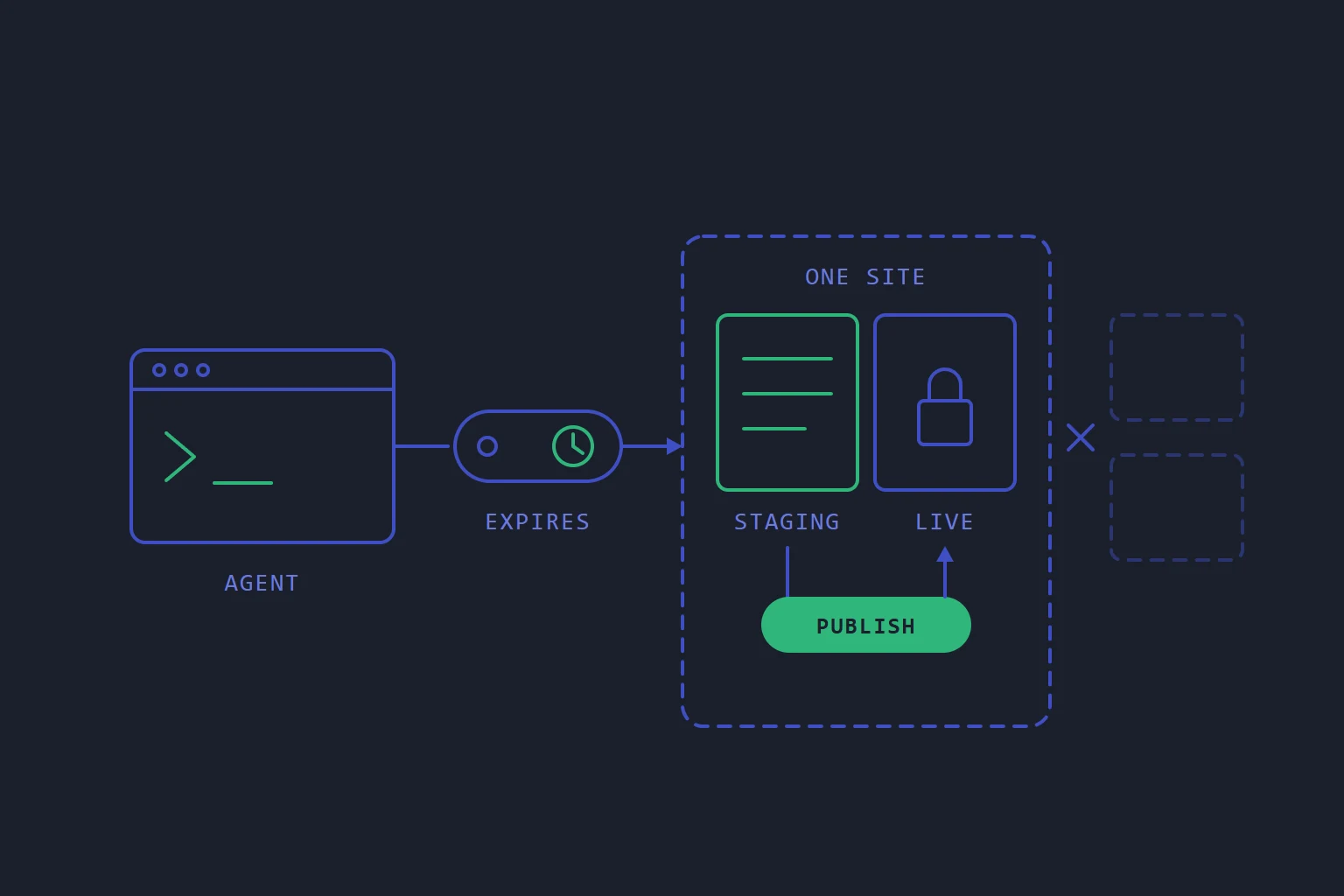
The usual way to let a coding agent work on a website is to hand it something that was made for a person: an SSH key, an FTP password, a control panel login. Each of those reaches further than the job does. A key for one site often opens every site on the account. A panel login can change billing, invite users and delete things. And all of them write straight to the live site, so the first person to see the agent's work is a visitor.
None of that is a judgement on the agent. It is a question of what you hand it.
Four properties worth insisting on
Whatever host or tool you use, a credential for an agent should have four properties.
It reaches one site. Not the account, and not everything the person who made it can see. An agent fixing your shop's checkout has no reason to read your blog's database or your invoices.
It writes somewhere that is not live. Agents are sometimes wrong with complete confidence. That is survivable on a copy and expensive on the real thing.
A person publishes. Going from copy to live should be a deliberate act by someone who has looked at what changed, not a side effect of the agent deciding it has finished.
It has a name, an expiry and an off switch. A name tells you which laptop holds it. An expiry means it stops working even if everybody forgets it exists. Revocation means a lost laptop is dealt with from your desk, the moment you notice. And if you can see when each one was last used, you can tell a forgotten credential from a busy one.
How we built it
On our web hosting, the control panel's Studio tab hands out exactly this kind of credential. It is an MCP connector, so it works with Claude Code or any other client that speaks MCP. You bring the agent and choose the model; we do not run it.
The connector reaches the one website it was made on and nothing else in your account. Through it the agent can read the site's details, the panel's own health diagnosis of it, its recent events and its DNS records. Scope is checked again on every call the agent makes, not only when it connects, because the agent chooses the arguments.
Files are where the line is firmest. The agent can list, read and write files only on a staging copy of the site. It cannot list, read or change the live site's files at all. Writing also has to be part of your plan; without it, the agent can look but not change anything.
Publishing is not one of its tools. On a WordPress site, the copy goes live when a person presses Push back to production on the live site's Apps tab. Before that, What would a push-back change? shows how many files would be added, changed and removed, and how the database would change. The push then takes a snapshot of the live site first, so today's version can still be restored from Backups. It needs backups turned on for the live site, and the button stays off until they are.
Making a connector asks for a name, such as "Claude Code on my laptop", and when it should stop working: 30 days, 90 days or a year. The token is shown once. The list shows when each connector was made, when it was last used and when it expires, and Revoke beside one means the agent holding it is refused from its next request.
Claude Desktop and claude.ai do not take a pasted token. They connect through a sign-in to your panel, where you choose the site you are approving, and that makes a connector like any other, in the same list and revoked the same way. That route is new, so tell us if your client has trouble with it.
The full steps are in Connect your own coding agent with Studio and Make a WordPress staging copy and publish it.
The route that skips all of this
One caveat, because it matters more than any of the above. The same Studio tab also gives each site a git remote, over the site's own SSH. A push to it updates the live site's files directly, with no separate publish step. That is the right tool for a person deploying their own work, and it refuses a push if somebody has edited files on the server since, rather than overwriting them.
For a site that is not WordPress, there is no publish button for a staging copy. Putting files live is a git push, by a person.
Which makes the point plainly: the protection is in what you hand over. If you give an agent your SSH key and the git remote, you have given it the live site, whatever the connector would have allowed. Give it the connector.
Doing this without us
You can get most of the way on any host.
- Make a copy at its own address, with its own database. A staging site that shares the live database is not a copy; one bad migration reaches both.
- Give the agent a user that can only write to the copy. A separate SFTP or SSH user whose home is the staging folder, and nothing else.
- Keep deployment as a separate act. A script or a push that you run, after reading the diff. If the agent can run it, it is not separate.
- Write down every credential you hand out, with the date it should be revoked, and revoke it on that date.
The short version
Do not give a coding agent a credential made for a person. Give it one that reaches a single site, writes only to a staging copy, cannot publish, and carries a name and an expiry. Check what else you have handed it, because an SSH key with a git remote undoes all four. And before your agent's work goes live, read what the push would change.
- ai
- mcp
- staging
- security
Read next
- HostingWhat "isolation" actually means in shared hosting
Most panels isolate per account. Doing it per website costs more and is the difference between one compromised site and all of them.
- HostingRestoring one file should not mean restoring the whole site
Most mistakes are one file, one table or one deleted thing. A restore that can only put back everything at once is a restore people avoid using.
- HostingShared hosting and a server answer different questions
The choice is usually framed as power versus price. It is really a question about who is responsible for the operating system — and that answer does not change as your traffic grows.
- SoftwareWhy a hosting control panel should never log in to your servers
A panel that reaches into servers to change them is a single key to every machine, and it only knows what it did, not what is there. Turn the arrow round.