

An overdue invoice should follow a timetable both sides can read in advance
What happens to an unpaid invoice day by day, from the first reminder to termination, and what a customer and a hosting company can each do at every step.

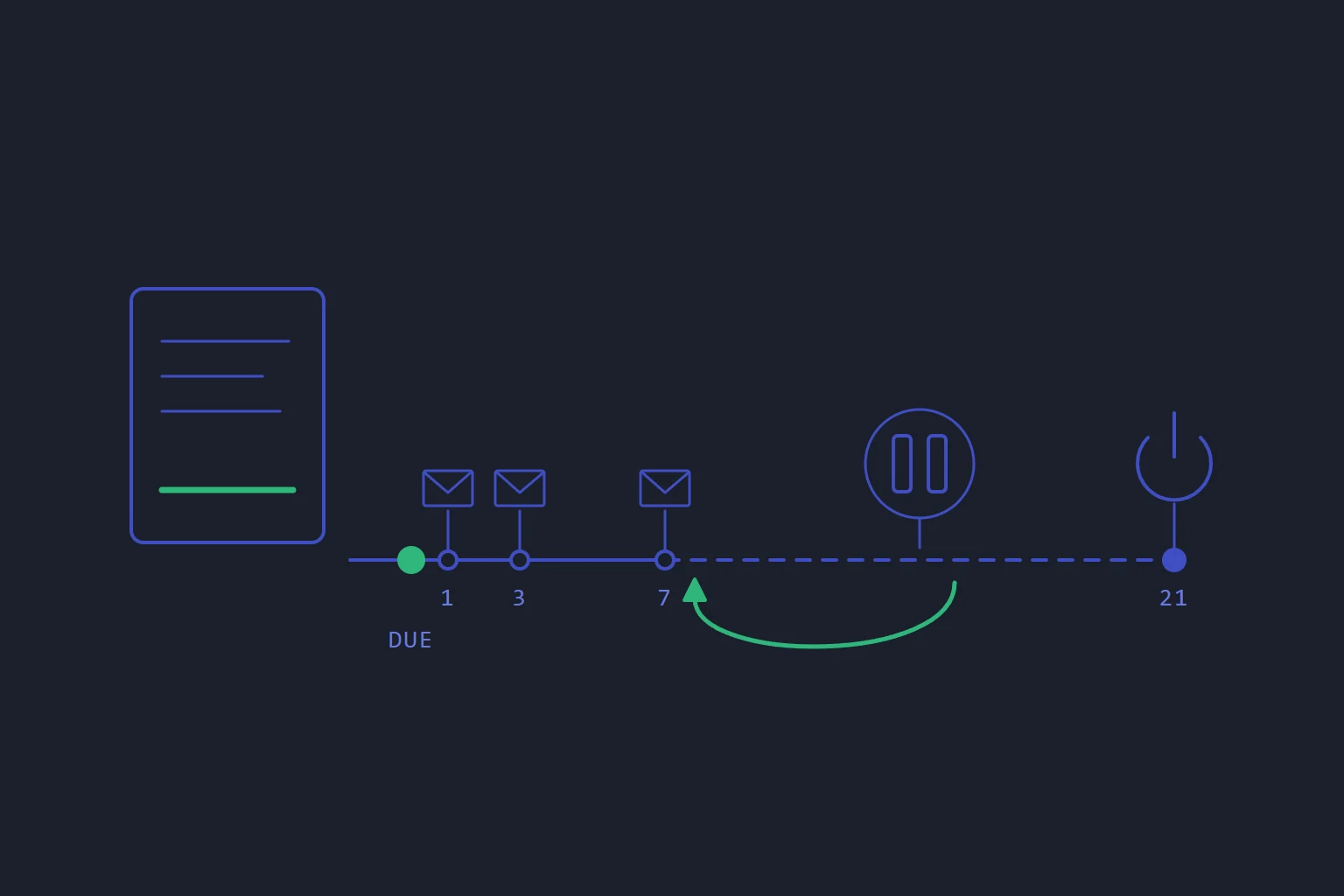
Every hosting company chases unpaid invoices. The process has a name, dunning, and in a lot of billing systems it is something nobody can quite describe: a cron job somebody wrote years ago, a reminder template, a suspension that happens "after a while".
That vagueness costs both sides. A customer who cannot see the next step finds out about it when the website goes down. A company that cannot state its own schedule cannot defend it, or change it with confidence.
This post walks through the default timetable in Zephyr, the billing software lbreeze itself runs on. It is written for two readers: a hosting customer who wants to know what happens if a payment slips, and a hosting company choosing the software that will make that decision for it.
The default timetable
Once an invoice's due date passes, it is marked overdue. From then on, counting days after the due date:
| When | What happens |
|---|---|
| Day 1 | First reminder email |
| Day 3 | Second reminder email |
| Day 7 | Third reminder email |
| More than 7 days overdue | The services that invoice pays for are suspended |
| More than 21 days overdue | Those services are terminated |
Two details matter more than the numbers. Suspension applies to the services the unpaid invoice pays for, not to everything on the account. And suspension and termination are different things: a suspended service is switched off but still there, while termination ends it.
A company can also charge a late payment fee. If it does, the fee arrives as a separate invoice, named as a late payment fee for the overdue one, rather than being added silently to the original.
If you are the customer
Paying lifts a suspension by itself. You do not need to open a ticket and wait for someone to notice. When the payment is recorded, the suspension that the unpaid invoice caused is lifted.
There is one condition, and it catches people out: the suspension is lifted only once nothing else on your account is past its due date. If three invoices are overdue and you pay the smallest, nothing comes back yet. Pay all of them.
A service suspended for any other reason, such as abuse, stays suspended however the account pays. Payment only undoes what non-payment did.
If you cannot pay yet, say so before the suspension date. Open a support ticket. Staff can pause the process on that invoice while a question about it is sorted out: no reminders, no late fee, no suspension and no termination for the length of the pause. The pause is visible to staff rather than in your client area, so ask them to confirm it is in place instead of assuming.
To stop it happening at all, look at two separate switches on each subscription, under Billing, then Subscriptions. Auto-renew raises the next invoice. Auto-pay charges your default saved card when that invoice falls due. Saving a card does not by itself pay anything; you tick Auto-pay on each service you want charged. It also depends on the company having automatic card payments switched on, so if a renewal invoice is still unpaid after its due date, pay it from the invoice yourself. The Upcoming renewals list on the Billing overview shows what renews in the next 30 days.
The steps with screens are in What happens when an invoice is overdue and Pay an invoice, save a card and turn on auto-pay.
If you are choosing billing software
The schedule above is a set of defaults, not a policy we impose. Every company has its own tolerance for late payment, and the software should let it say so in one place. When you evaluate a billing system, these are the questions worth asking, with how Zephyr answers them.
Is the schedule a setting, or is it in the code? In Zephyr it is three settings, on the Overdue invoices card under Settings, then Billing: the reminder days, the days before suspension and the days before termination. The worker that runs the process reads them every time it runs, so a change applies without a restart.
Does it refuse a schedule that makes no sense? A schedule with no reminders at all is refused, because suspending a customer who was never chased is exactly the failure dunning exists to prevent. So is termination that does not come after suspension. Reminders are limited to ten, each within 90 days of the due date; suspension can be set from 1 to 180 days and termination up to 365. If a stored value is ever broken, the worker falls back to the default for it and logs a warning, rather than guessing.
Does payment undo the suspension without a person in the loop? It should, and it should undo only what dunning did. Zephyr lifts dunning suspensions when an invoice is paid and the account has nothing else past due, and leaves every other suspension alone.
Can staff pause one invoice without switching dunning off for everyone? A disputed line, a payment already in the post or a customer waiting on their own purchase order needs a per-invoice answer. In Zephyr, the invoice page in the admin shows whether dunning is active on it, with a Hold 14 days button and a Resume. A hold stops reminders, late fees, suspension and termination on that invoice only.
Is automatic charging something you choose? Auto-pay ships switched off. Taking money from a saved card without the customer pressing a button is a decision the company makes deliberately, not one it inherits.
Is termination treated as final? The settings screen says plainly that termination is permanent and cannot be undone. A billing system should make the irreversible step the one that needs the most days and the most thought.
The short version
- By default: reminders on days 1, 3 and 7 after the due date, suspension after 7 days overdue, termination after 21.
- Those are defaults. The company that bills you can set different days, and good software makes that a setting, not a code change.
- Paying lifts a suspension by itself, once nothing else on the account is overdue.
- If you cannot pay yet, ask for the invoice to be paused before the suspension date, not after.
- Turn on auto-pay per subscription if you want renewals charged without thinking about it.
For a hosting company, the test is simple: you should be able to read your own dunning schedule on one screen and explain it to a customer in one sentence.
- billing
- invoices
- dunning
- zephyr
Read next
- SoftwareWe sell billing, the control panel and monitoring separately because each one owns different facts
Zephyr, kstack and Standby are three products, not a suite. The reason is a rule about who owns which fact, and it is just as useful if you only ever run one of them.
- SoftwareA checkout should refuse the order it cannot fulfil
Billing systems take the money first and provision second. That ordering is correct, and it means every gap in your provisioning becomes a charge you have to explain and a refund you have to make.
- SoftwareMigrating off WHMCS without a bad weekend
The reason people stay on billing software they dislike is the migration. It is survivable if you rehearse it instead of attempting it.
- SoftwareWhy a hosting control panel should never log in to your servers
A panel that reaches into servers to change them is a single key to every machine, and it only knows what it did, not what is there. Turn the arrow round.